Electronics in Telegram. From model selection to order.
Review updated on 6 October 2026
A live V21.1 store and separate V23 design: electronics catalogue, device variants, cart, order management and verified photos.
Store V21.1 is live; V23 design and subsequent photo batches are being reviewed locally. The catalogue, orders and team workflow are preserved. Complete photo coverage and releasing the new design are next steps.
Updated store home page in a separate local version; the live store remains on V21.1.
1 / 4
Live storeV_CODE · V21.1 / V23
Ready to show. Room to grow.
Store V21.1 is live; V23 design and subsequent photo batches are being reviewed locally. The catalogue, orders and team workflow are preserved. Complete photo coverage and releasing the new design are next steps.
ALREADY IMPLEMENTED
Telegram Mini App, web catalogue and product posts
Brand → family → model → variant
Search, favourites, comparison and cart
Catalogue and order management bot
Official photographs matched to model and colour
New V23 design prepared on a separate copy
NEXT STAGE
Release V23 after separate validation
Complete product-photo selection and matching
VISUAL SYSTEM
Branded dark and light palettes
Explore the project within this case study. The product link is not yet open.
WORK ON THE PROJECT
Behind every screen — a specific decision.
Electronics shoppers in Telegram and the store team managing products, orders and customer communication. Updated 6 October 2026
01
A live store and a new local version
Version V21.1 went live on 24 September. A separate V23 design has been prepared and is being reviewed locally; it is not presented as the deployed version.
Telegram Mini App, web catalogue, product posts and a route to the manager.
V23 refreshes the home page, catalogue, product pages, services, cart, profile and footer.
Navigation sits in the header on desktop and at the bottom on mobile.
02
From brand to order
The catalogue moves from brand and family to model and device variant. Product cards show specifications, images and available actions.
Search, categories, favourites, comparison and cart.
A management bot brings together products, orders, customers and reports.
Preorders that require a manager’s quote are not assigned invented prices.
03
Real product photography
Official images are matched to the correct model and colour. Existing manual assignments are preserved; generated artwork does not replace photos of specific devices.
Category covers and full-device framing on cards have been corrected.
Some verified photos are already live; subsequent batches remain local.
Complete product-photo coverage is still in progress.
04
Development with clear release boundaries
Design and photo updates are first checked against an isolated catalogue copy. Prices, orders and stock are not recreated for a visual refresh.
Local V23 captures and earlier live screens carry different labels.
An AI adviser is not presented as an active feature; it is hidden at the owner’s request.
PROJECT VIDEO
See how it works.
From homepage to cart
Video overview: homepage, brands, product list, product page and cart. An edit of real store screens, with no order submitted.
SCREENS AND MATERIALS
The project in detail.
Open a material to explore the details and read the breakdown. Type and version are listed under each frame.
12 photos
01
Interface · V23 · local design
V_CODE — V23 home page
Updated store home page in a separate local version; the live store remains on V21.1.
02
Interface · V23 · local design
V_CODE — V23 catalogue
New catalogue layout and device category.
03
Interface · V23 · local design
Verified device image
Corrected Apple TV presentation in the local catalogue.
04
Interface · V23 · local design
Desktop catalogue
Desktop catalogue with dedicated navigation.
05
Interface · Previous version
Store entrance
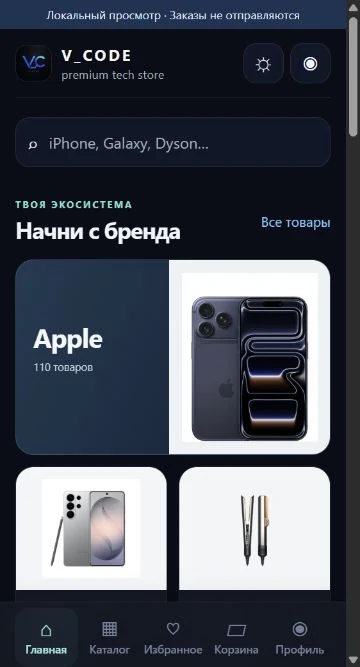
The homepage connects visual identity, search and catalog. A real screen from the web store.
06
Interface · Previous version
Browse by brand
Choosing a brand leads to categories and products. Customers move from a broad selection to a specific device.
07
Interface · Previous version
Products and sorting
A product grid with photos and prices, alongside sorting, favorites and comparison tools.
08
Interface · Previous version
Device page
Device options, availability and price in one place. The selection leads to the next purchasing step.
09
Interface · Previous version
Cart before checkout
Customers see order contents and totals before submitting. Captured in the live shop without making a purchase.
10
Telegram · Previous version
From a post to a purchase
We connected product posts to action: customers see an offer and can select a product or contact a manager.
11
Management · Previous version
Management through Telegram
The real management bot panel. Core store sections are available in one menu: products, orders, customers, analytics, marketing, repairs and bundles.
12
On a phone · Previous version
A store on a small screen
The real store interface at 390px. Catalog, favorites, cart and profile are in bottom navigation; search and brands adapt to a narrow screen.
01CHALLENGE
Bring convenient electronics shopping and store operations into Telegram.
02SOLUTION
Version V21.1 went live on 24 September. A separate V23 design has been prepared and is being reviewed locally; it is not presented as the deployed version. The catalogue moves from brand and family to model and device variant. Product cards show specifications, images and available actions.
Telegram Mini App, web catalogue and product posts
Brand → family → model → variant
Search, favourites, comparison and cart
Catalogue and order management bot
Official photographs matched to model and colour
New V23 design prepared on a separate copy
03RESULT AND STAGE
Store V21.1 is live; V23 design and subsequent photo batches are being reviewed locally. The catalogue, orders and team workflow are preserved. Complete photo coverage and releasing the new design are next steps.
OUR ROLE
Product, design, development, automation
PLATFORM
Telegram Mini App + bot + management
MAIN FOCUS
Easy purchasing for customers. Clear records for the team.
04USER JOURNEY
Considered at every step.
01
Choose
Categories and tech product cards help customers find what they need.
02
Place an order
Customers build an order inside Telegram.
03
Process
The team manages orders, statuses and products.
04
Monitor
Orders, statuses and the catalogue are brought together in store management.
WHAT CONNECTS THE PROJECT
One environment
A post leads directly to a product page in the Mini App.
Management from within
Product development includes administrative workflows and error feedback.
A foundation for growth
The catalog, content and features can grow with the store.