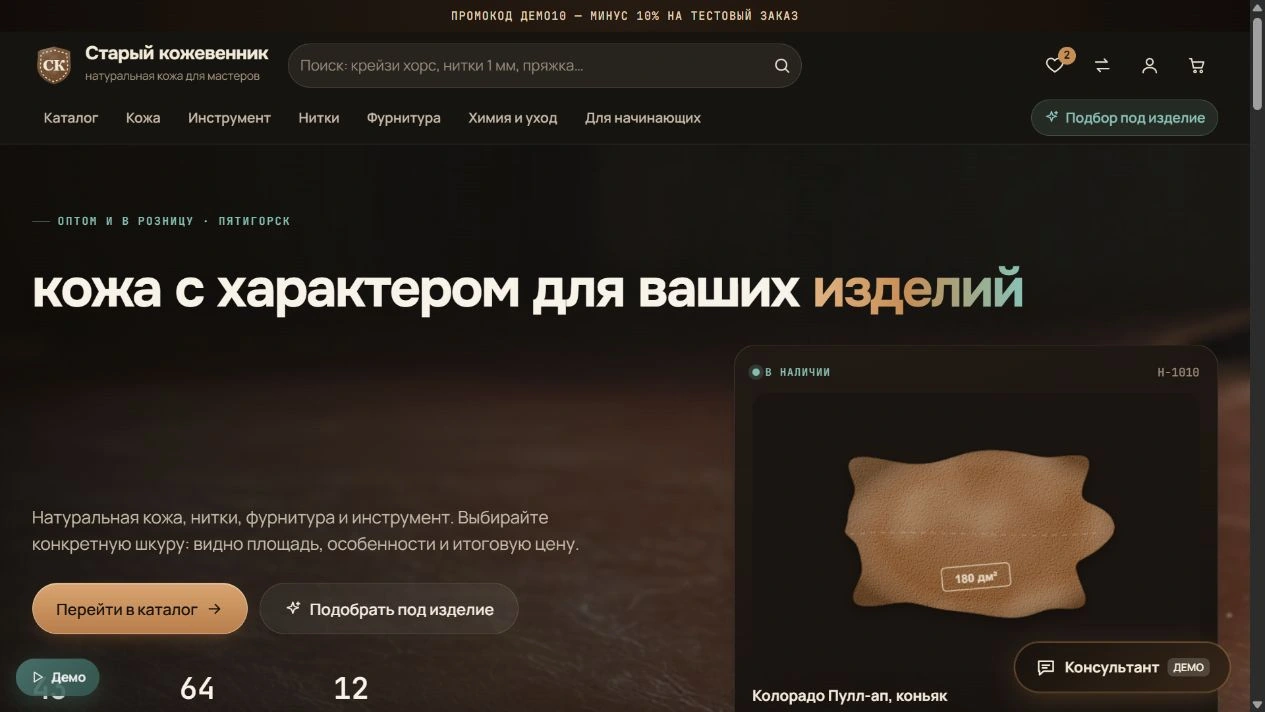
A dark textured scene, large typography and direct routes to the catalogue or guided selection.
1 / 15
WORK ON THE PROJECT
Behind every screen — a specific decision.
Craftspeople need the right material and individual hide. The store needs clear stock, reservations and order handling. We designed both sides of that process. Updated 18 October 2026
01
A new storefront identity
We retained the craft identity and translated it into a modern digital workshop.
Dark chocolate, cognac accents, cream surfaces and expressive textures.
Large typography, clear hierarchy and distinct storefront and administration layers.
A hero scene and a prepared pull-up effect video, labelled as demonstration media.
Responsive header, mobile menu, search and cart access on compact screens.
02
A catalogue that supports decisions
Buyers can start with a material type or the item they want to make.
Sections for leather, tools, thread, hardware and care products.
Search, combined filters and sorting; favourites and comparison for shortlisting.
Collections for wallets, bags, belts and beginners.
Product details include thickness in mm and oz, tanning, finish, colour, origin and recommendations.
03
Every hide is an individual item
The system accounts for natural differences between hides, beyond product names.
Hide ID, area, grade, characteristics, warehouse and availability.
Individual price equals area × price per dm², shown before checkout.
Selection of the exact hide and matching thread, tools and hardware.
Reservations link to orders; cancellation releases the corresponding material in the demo workflow.
04
3D, lighting, bending and reverse side
Interaction explains the material before purchase and makes it more tangible.
Rotatable roll and stitched sample, controlled with mouse, touch and keyboard.
A dedicated viewer controls light direction and bend amount.
Demonstrates oil-tanned leather lightening at a bend and a reverse-side view.
Textures are procedural illustrations of material behaviour, not scans of the actual hide.
05
Cutting maps and material matching
We help estimate material requirements and possible layouts.
Hide zones, marked defects and selectable patterns for several products.
Estimates of item count, used area and leather cost per item.
Layouts are approximate; a craftsperson determines the final cut and stretch direction.
The consultant matches kits to tasks and budgets. The current demo uses local rules, without a connected AI model.
06
Purchasing and customer accounts
We connected material selection, checkout and repeat visits.
Cart, field validation, demonstration promo codes, discounts and delivery calculations.
Order history, statuses, repeat orders and manager-curated selections.
Selection assistance can be requested from a product page or the consultant.
Payments and shipping are simulated; no real charges or deliveries occur.
07
Orders and the team dashboard
Administrators see orders alongside the next actions required.
Overview of new orders, paid amounts, reservations, low stock and assistance requests.
Order details include items, customer, owner, comments, tasks and status history.
Status and payment filters, confirmation, cancellation, hide replacement and reservation handling.
Invoice and tracking flows are demonstrations, without external service connections.
08
Stock and assortment
Inventory separates individual hides from ordinary stock items.
Batches, area, grade, defects, photographs, storage location and hide status.
Receiving, publication, reservations and a movement log.
Product creation and editing, images, archiving and batch actions.
CSV import with preview and validation, plus catalogue export.
09
CRM, content and roles
We prepared tools for the daily work of salespeople and editors.
Retail and wholesale customer records, purchase history and individual terms.
Requests, tasks, curated selections and customer-specific reservations.
Editing hero content, collections, promo codes and SEO fields.
Owner, manager, warehouse and editor roles are demonstrations, not production authentication.
10
Published scope and next steps
The demo is hosted separately for review without affecting the existing store.
Public demo changes are saved only in the visitor’s browser.
Demo orders, customers, inventory and prices are not live store data.
Commercial launch requires secured server operations, real content and verified permissions.
Payments, delivery, 1C and notifications need separate integration; kojevennik.ru remains unchanged.
BEFORE / AFTER
From catalogue to digital workshop.
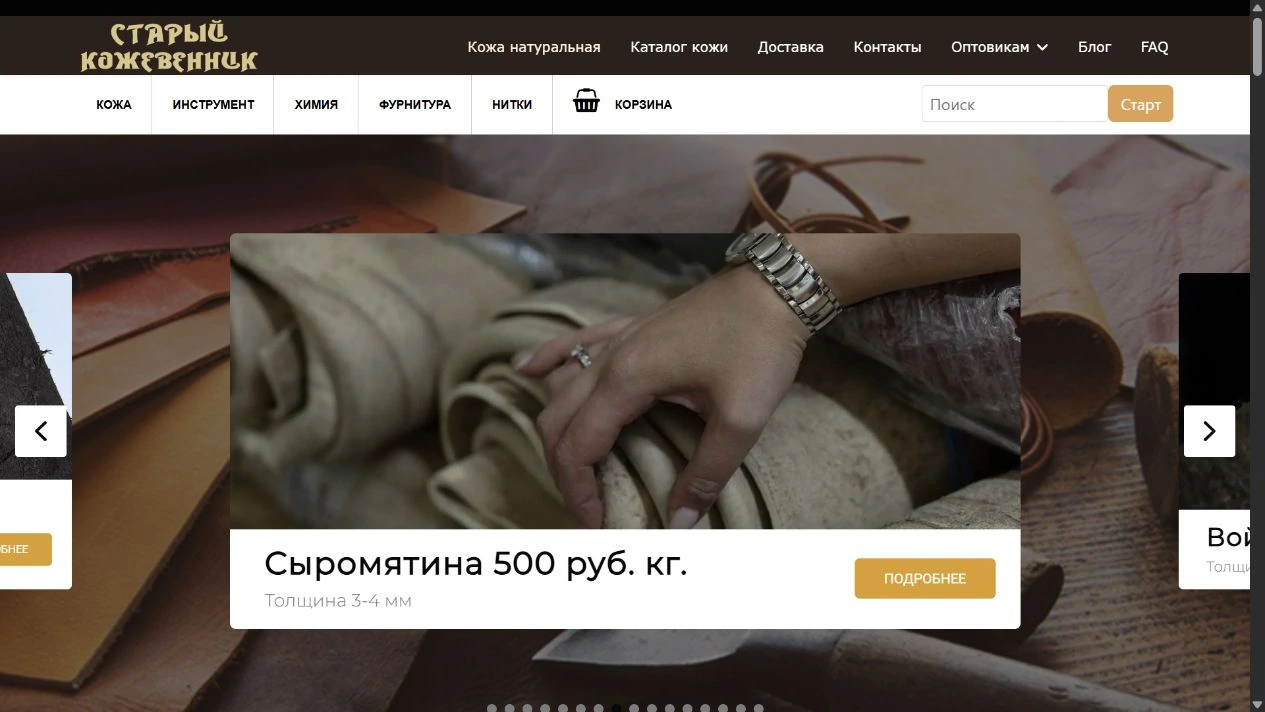
Left: the existing kojevennik.ru captured on 18 October 2026. Right: our new demonstration. This compares visible interfaces; the previous admin system was not assessed.
Before — the existing store
Categories, a product slider, pricing and familiar store navigation. This is a real screenshot of the previous design.
Open a material to explore the details and read the breakdown. Type and version are listed under each frame.
15 photos
01
Interface · Current version · October 2026
New homepage: a digital workshop
A dark textured scene, large typography and direct routes to the catalogue or guided selection.
02
Interface · Current version · October 2026
Catalogue and filters
Categories, search and material parameters help narrow the selection.
03
Interface · Current version · October 2026
An individual hide
Specifications, ID, grade, area and individual price share one page.
04
Interface · Current version · October 2026
Bending and lighting in 3D
Sliders adjust bending and light direction. This interactive material illustration uses a demonstration texture.
05
Interface · Current version · October 2026
Approximate cutting map
Patterns overlay the hide outline, alongside area, item count and estimated material cost.
06
Interface · Current version · October 2026
Selection for a craft project
Start with the intended item, then choose materials and accessories.
07
Interface · Current version · October 2026
Customer account
Orders, statuses and personal workflows sit outside the catalogue. All data shown is synthetic.
08
Management · Current version · October 2026
Owner dashboard
Orders, reservations, low stock and tasks on one screen. Figures are demonstration data.
09
Management · Current version · October 2026
Order queue
Status, payment and owner filters support order handling.
10
Management · Current version · October 2026
From order items to fulfilment
The record connects customer, individual hide, owner, comments and history.
11
Management · Current version · October 2026
Individual-hide inventory
Each hide has its own ID, area, status and storage location; ordinary stock is tracked separately.
12
Management · Current version · October 2026
Customers and CRM
Retail and wholesale records, history and individual terms. Contacts shown are demonstration fixtures.
13
Management · Current version · October 2026
Assortment management
Product creation, batch actions, CSV import and export share one section.
14
Management · Current version · October 2026
Content and marketing
Hero content, copy, collections and promotions are managed without editing code.
15
On a phone · Current version · October 2026
Mobile storefront
Compact navigation, search, cart and primary actions were checked at a 390 px viewport.
01CHALLENGE
Rethink a leather store for craftspeople and wholesale buyers: help choose materials, see the price of a specific hide and connect purchasing to sales and stock operations.
02SOLUTION
We developed a new visual system, responsive catalogue and detailed material page. Individual hides, accessories, cart, customer accounts and administration form one workflow. A separately hosted demo uses test data.
Purchase a specific hide by ID and area
Interactive cutting map and material estimates
3D sample: rotation, reverse side, lighting and bending
Search, filters, comparison and favourites
Match leather, thread and hardware to a project
Orders, reservations, stock and movement history
CRM, customer terms and curated selections
Content, promotions, SEO and team tools
03RESULT AND STAGE
A detailed demonstration of the new commerce system is available, including its admin panel. Commercial launch requires real inventory and photography, secured authentication, payments, delivery and notifications. The existing kojevennik.ru store remains in place.